
Maximizing your gains
Managing Risk and Preserving Gains
You can gain 80% in a day, or lose 80% in a day. If the wallet you're following enters a losing streak, you can reduce your exposure and preserve capital by setting up the right filters and controls.
Use the following in order of importance:
- Set Token Filters
- Min Token Age: Set to > 2 hours (ideally 8 hours)
- Min Market Cap: > $800k (ideally > $2 million)
- Jupiter Organic Score: Always set to > 55
- These help avoid high-volatility or low-liquidity tokens that can nuke quickly.
- Use Proper Ratio Settings
- If the wallet you're copying loses 5%, but you lose 30%, your copy ratio is incorrect.
- Run
/ratio-helpto learn how to calculate it correctly. - Ensure your copy trade max size and ratio align with the wallet's typical trade sizes.
- Set a Stop Loss
- Configure your stop loss in
/settings_dlmmto limit downside risk on any single position. - This helps automate exits on failed tokens and protect against large drops.
- Configure your stop loss in
- Set a Take Profit Percentage — Auto closes a position when it reaches a set % profit
- Enable SOL-Only Mode
- This setting avoids risky tokens and only copies SOL-based trades.
- Reduces chances of being stuck in illiquid or volatile tokens.
- Enable Single Pool Per Token
- Prevents the bot from opening multiple positions in the same token.
- On a bad trade, you'll take one hit instead of several.
- Limit Trade Frequency
- Cap your positions to 1 every 6 hours if needed.
- This makes it easier to track which trades are affecting your balance and simplifies reviewing DMs.
Treat copy trading as a marathon — not a sprint.
1. LPAgent and Metlex Accuracy
- LPAgent stats may not always reflect reality.
See: https://discord.com/channels/687032564829126657/1362307923069636788/1389525984612712559 - Use the Metlex links from the bot's DMs to analyze trade results — they’re often more accurate.
- On LPAgent, click the chart icon for the trade, switch to 1-minute view, and scroll to the time of your exit.
Look for sudden token price movements that may have impacted your exit result.
2. Avoid Following Over-Copied or Risky Wallets
Avoid wallets that:
- Focus on token-only or mixed token/SOL plays
- Trade low market cap tokens (< $2M)
- Are followed by too many users (use
/get_pnlto check)
These wallets often have worse execution for copiers due to slippage on both entry and exit.
3. Recover Lost or Idle SOL
Visit the farming app and click on Burnlify (bottom left).
Use both flows to:
- Burn old tokens
- Close empty accounts
This helps free up locked SOL and improve your wallet’s real balance.
4. Check and Adjust Your Ratios
If your results are worse than the wallet you're following, recheck your copy ratio:
- They may have lost 50% on a trade, but only risked 5% of their capital
- If you cap your size and skip their bigger trades, you’ll miss the winning ones and absorb all the bad ones
- Always use
/ratio-helpto understand how to balance your size and exposure
5. Optimize Fees
Run /settings and check the following:
- Priority Fee: Set to Medium or Low
- Max Jito Fee: Cap it around 0.00005–0.0001 SOL (~1 cent)
Don’t overspend 17 cents per tx when 1 cent is enough.
Track your fee history:
6. Review Your Copy Setup
- Follow 1–2 wallets only for better focus
- Check your DMs to audit:
- PnL images
- Trade entries and exits
- Unexpected balance changes
7. Tune Token Settings
Run /settings_dlmm → More Settings to adjust:
- Increase Token Age or Market Cap filters to avoid volatile or low-liquidity coins
- Decrease these filters if you're missing early opportunities and want to take more risk
8. Still Need Help?
If you're still confused, go to the public support channel and post:
- Your wallet address
- The wallet you're copying
- What specifically looks wrong
Here’s a shortened version of the section for the Maximizing Your Gains page. It keeps all key insights but cuts down the length for faster reading.
PNL Image Says Green, Wallet Says Red?
Sometimes your PNL image or Metlex shows a profit, but your wallet balance says otherwise. Here’s how to check what actually happened.
1. The PNL Says You're Up
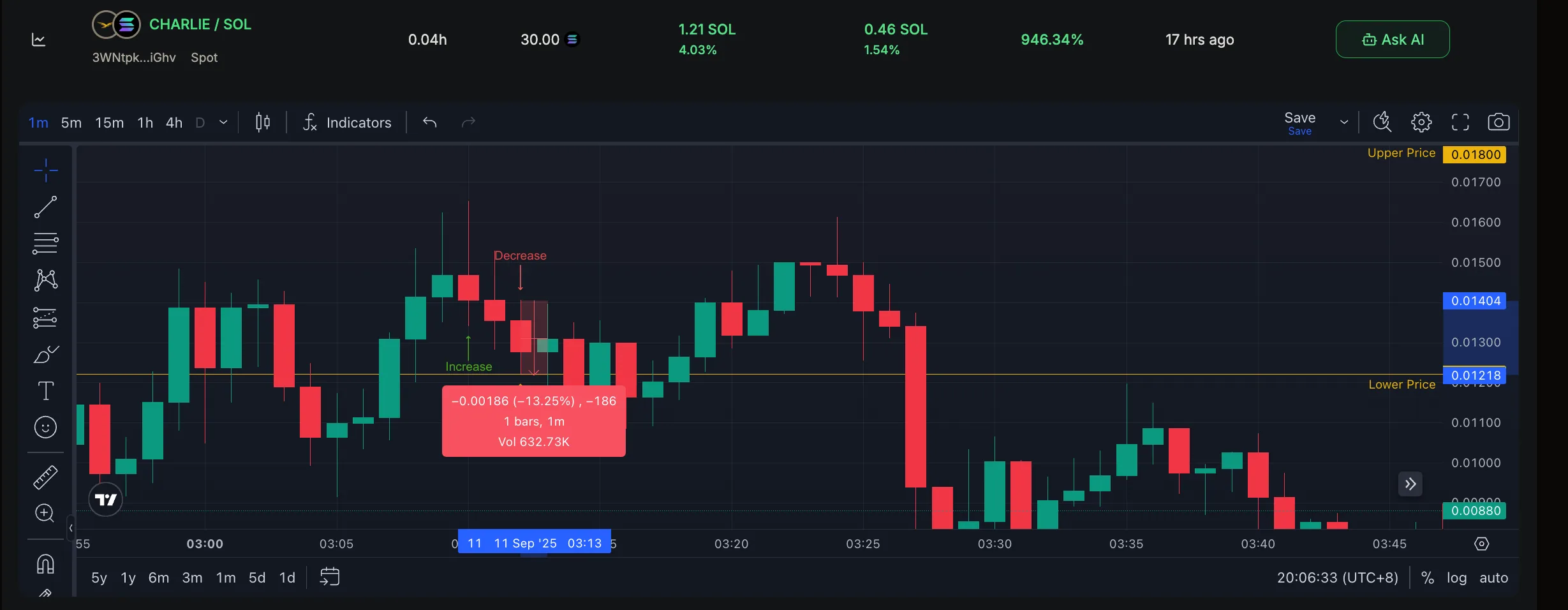
In this example, it shows a 0.46 SOL gain, but the wallet balance actually dropped.
2. Check the 1-Minute Candle on LPAgent
- Go to the position on LPAgent → click the chart icon
- Switch to 1m view, find the time the position closed
- Use the ruler tool — in this case, the token dropped 13.25% in the same minute it was closed
The trade exited after the dump, not before — this is why the final result is red.
3. Click into the Position
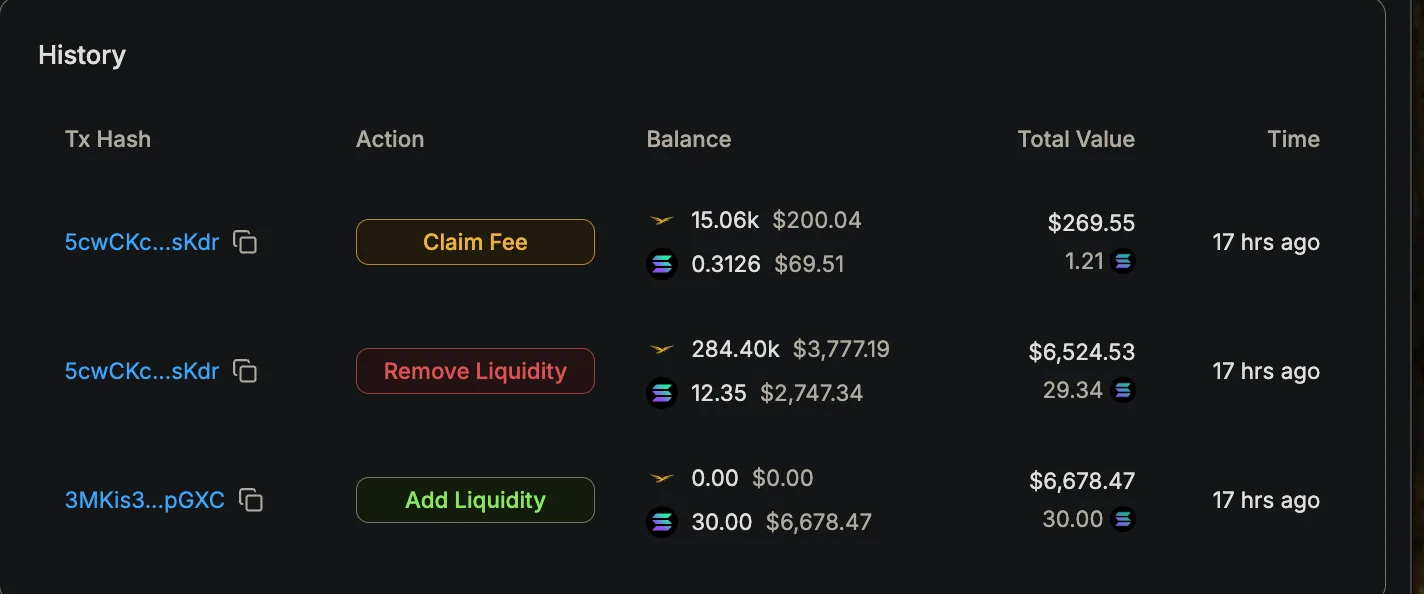
- Check how much token you had on exit — here it shows $3,777 worth
- In theory that would convert to SOL at full value, but:
- The token price dropped during the swap
- Meteora charges swap fees (1–10%) when you exit
4. Confirm on Solscan

- You got 16.75 SOL from the token swap
- Add that to the 12.35 SOL from the position = 29.1 SOL out
- You deposited 30 SOL
→ Final result: 0.9 SOL loss, not a gain